ALU Basics
Please Log In for full access to the web site.
Note that this link will take you to an external site (https://accounts.google.com) to authenticate, and then you will be redirected back to this page.
So far we have learned how to represent signed numbers in binary using 2's complement, and we have built a circuit that generates the 2's complement of an input for us.
Now in this section, we will figure out how to perform subtraction using the previously learned circuits, then how to choose between addition and subtraction, and finally understand the basics of an ALU.
With this, we will reach our goal of building our own signed calculator.
1) Binary Subtraction Using 2's Complement
In the previous section on signed arithmetic and overflow, we learned that when we add the 2's complement of a number to itself, we get a 0 in fixed-bit binary arithmetic as a consequence of overflow.
Now that we have a solid representation for negative numbers, let's try subtraction using an adder circuit

2) Introducing the Arithmetic Logic Unit (ALU)
In real processors, arithmetic operations such as addition and subtraction—and logical operations such as AND or OR—are grouped into a single block called the Arithmetic Logic Unit, or ALU.
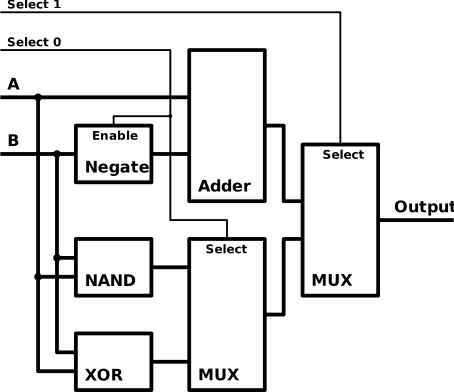
The ALU typically has two data inputs, a result output, and a set of control lines that decide which operation is performed. These control lines are what allow the same internal circuitry to compute sums, differences, or logical results.
3) Selecting Operations Using a Multiplexer
To allow our circuit to perform either arithmetic or logic operations, we will use a Multiplexer to choose between different inputs based on a control signal. For this, we will need individual blocks handling each operation as well as the multiplexer to select.
For this simplified example, we will select between four different operations: addition, subtraction, bitwise NAND, and bitwise XOR.
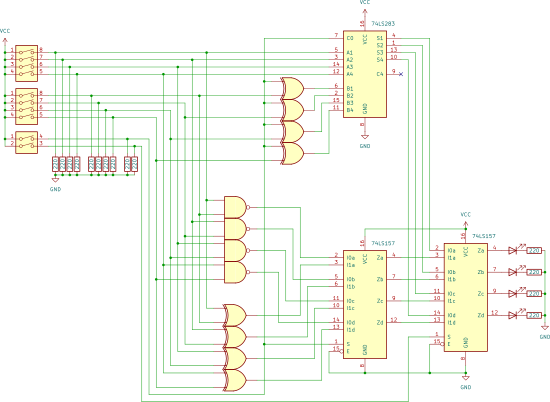
Components you'll need:
- 1× 74283 4-bit Binary Adder IC
- 2× 74157 Quad 2-to-1 Multiplexer IC
- 2× 7486 Quad XOR gate IC
- 1× *7400 Quad NAND gate IC
- 2× 4-bit DIP switches
- 1× 2-bit DIP switch
- 4× LEDs
- 14× 220Ω resistors
- Breadboard & Jumper wires
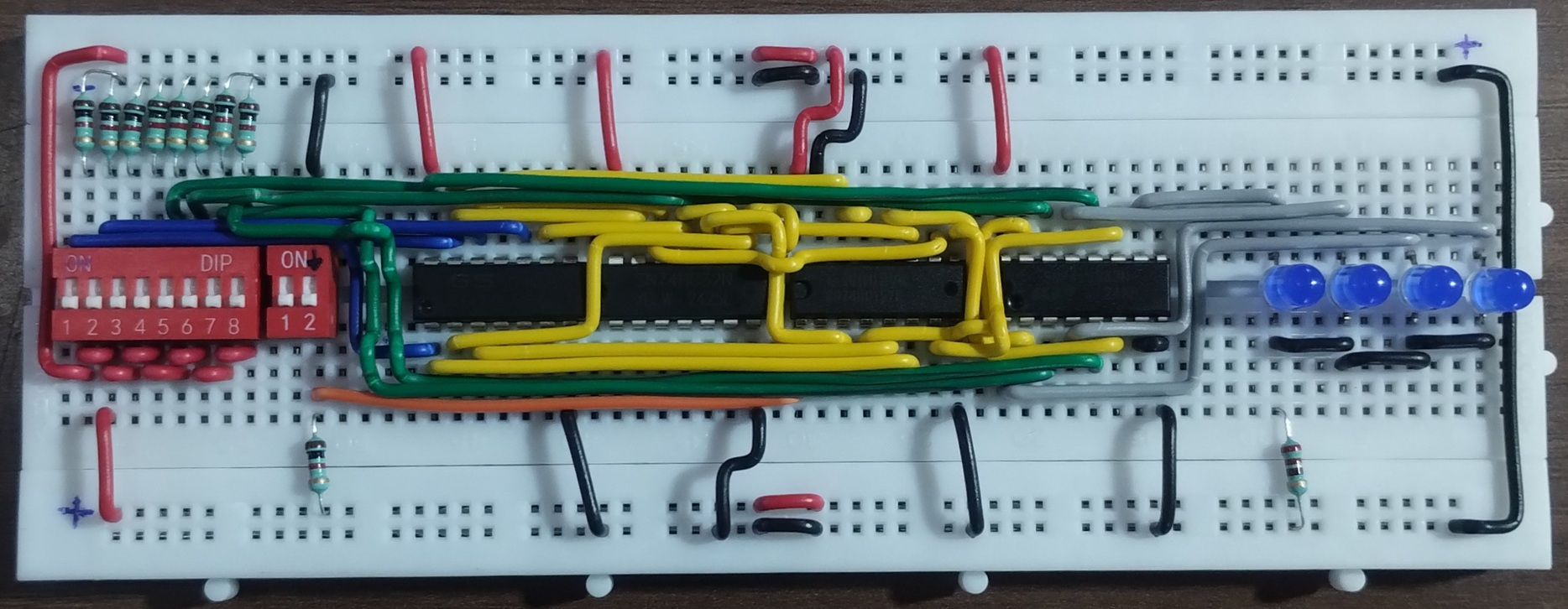
Final Submission
In the next section, we will understand the working of an ALU IC - 74181.