Reset
Please Log In for full access to the web site.
Note that this link will take you to an external site (https://accounts.google.com) to authenticate, and then you will be redirected back to this page.
In the previous exercise, you learnt how to wire up counters with 7 segment displays and cascade them. Now you have a counter that goes 0, 1, 2, 3... all the way up to 99 before rolling over. But for a real clock, we need the seconds to reset at 60 (not 99), the minutes to reset at 60, and the hours to reset at 12 (not 99).
In this exercise, you'll learn how to use logic gates to reset counters at specific values. By the end, you'll understand the techniques needed to build a proper digital clock that displays time in the format we're all familiar with!
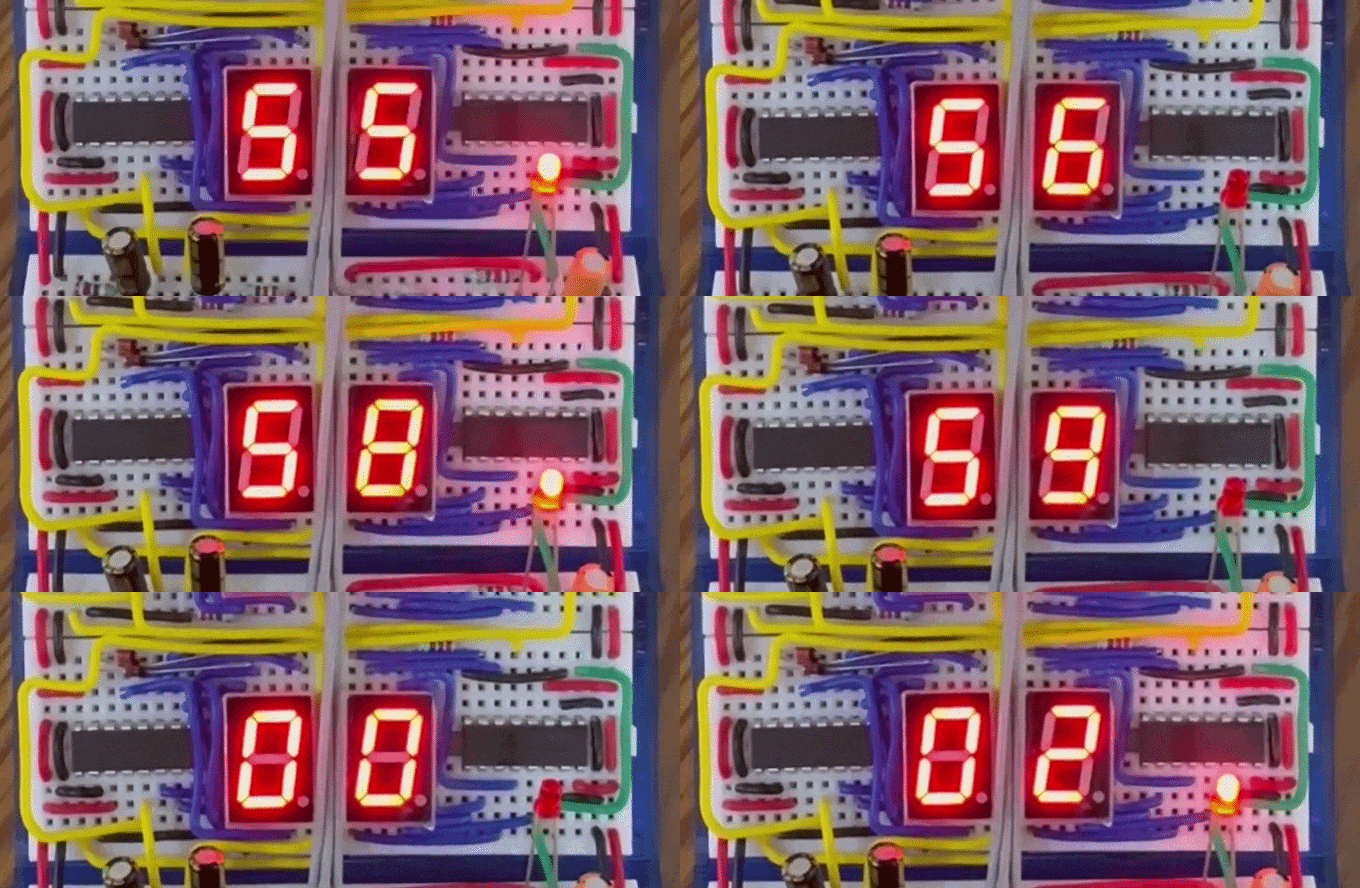
1) Review: The Reset Pin
Let's review what you learned about the CD4026's reset functionality.
Looking back at the CD4026 pinout:
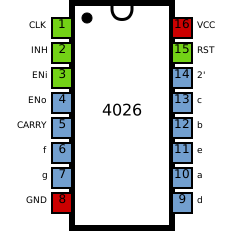
Pin 15 (Reset):
- When LOW (connected to GND): Counter operates normally
- When HIGH (5V): Counter immediately resets to 0
- Must be kept LOW for normal operation

Manual Reset Button (Review)
In the previous exercise, you built a reset button for your cascading counter. Let's review how it worked:
* Button connects between 5V and reset pin
* When pressed: reset pin goes HIGH → counter resets to 0
* When released: reset pin returns to LOW → counter can count again
This manual reset is useful for setting the time, but for automatic resets (like at 60 seconds), we need the counter to reset itself based on its displayed value.
2) The Challenge: Automatic Reset at Specific Values
For a digital clock, we need:
- Seconds: Count 00 → 59, then reset to 00 (reset at 60)
- Minutes: Count 00 → 59, then reset to 00 (reset at 60)
- Hours: Count 00 → 11, then reset to 00 (reset at 12)
The key question: How can we detect when the counter reaches a specific value and automatically trigger a reset?
To do this robustly, we use Logic Gates.
3) Logic Gate Reset Circuit
Logic gates provide a highly reliable way to detect specific numbers. By combining logic gates (AND, OR, NOT, NAND), we can look at the output segments of the CD4026 and generate a HIGH pulse only when a specific number is reached.
Revisiting Logic Gates
In a previous exercise in this module, you studied about Logic gates and their truth tables. We will use logic gate ICs here to create the reset logic for our clock. A common one is the 74LS00 Quad 2-Input NAND gate. A NAND gate outputs LOW (0) only if both inputs are HIGH (1). For all other input combinations, it outputs HIGH. You can combine NAND gates to create AND gates or other logic functions.
Detecting "6" for Seconds/Minutes Reset
Let's design a circuit to reset at 60. We need the tens digit to reset when it hits 6. Looking at the segment states for digit 6: segments e, f, and g are all HIGH.
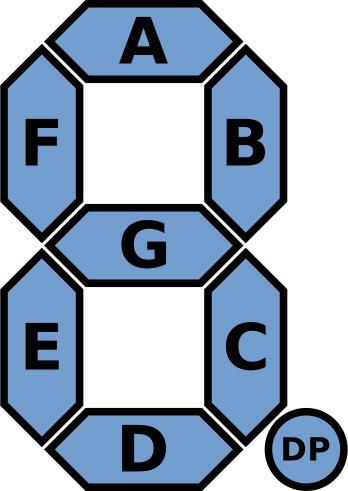
| Digit | a | b | c | d | e | f | g |
|---|---|---|---|---|---|---|---|
| 0 | ✓ | ✓ | ✓ | ✓ | ✓ | ✓ | ✗ |
| 1 | ✗ | ✓ | ✓ | ✗ | ✗ | ✗ | ✗ |
| 2 | ✓ | ✓ | ✗ | ✓ | ✓ | ✗ | ✓ |
| 3 | ✓ | ✓ | ✓ | ✓ | ✗ | ✗ | ✓ |
| 4 | ✗ | ✓ | ✓ | ✗ | ✗ | ✓ | ✓ |
| 5 | ✓ | ✗ | ✓ | ✓ | ✗ | ✓ | ✓ |
| 6 | ✓ | ✗ | ✓ | ✓ | ✓ | ✓ | ✓ |
| 7 | ✓ | ✓ | ✓ | ✗ | ✗ | ✗ | ✗ |
| 8 | ✓ | ✓ | ✓ | ✓ | ✓ | ✓ | ✓ |
| 9 | ✓ | ✓ | ✓ | ✓ | ✗ | ✓ | ✓ |
Notice that segments e and f are both HIGH for 0, 6, and 8. If we AND segment e, segment f, and segment g, we get a HIGH signal only for 6 and 8. Since the counter counts up from 0, it will hit 6 first and reset!
Hands-On: Two-Button AND Circuit
Before hooking up the counter, let's test a simple AND logic circuit using the 74LS00 NAND gate IC to create an AND gate. (By connecting the output of a NAND gate to both inputs of a second NAND gate, you invert it and create an AND gate!)
1. With power OFF, place a 74LS00 IC on your breadboard straddling the center gap.
2. Connect Pin 14 to 5V (VCC) and Pin 7 to Ground (GND).
3. Connect two push buttons to 5V, and their other sides to Pin 1 and Pin 2 of the 74LS00.
4. Add 10kΩ pull-down resistors from Pin 1 to GND, and Pin 2 to GND.
5. Connect the output of the first NAND gate (Pin 3) to both inputs of the second NAND gate (Pins 4 and 5).
6. Connect an LED (with a 220Ω resistor) to the final output (Pin 6).
7. Turn power ON.
| NAND gate (pins 1,2 → 3) | NOT gate (pins 4,5 → 6) | ||||
|---|---|---|---|---|---|
| Pin 1 | Pin 2 | Pin 3 | Pin 4 | Pin 5 | Pin 6 |
| 0 | 0 | 1 | 1 | 1 | 0 |
| 0 | 1 | 1 | 1 | 1 | 0 |
| 1 | 0 | 1 | 1 | 1 | 0 |
| 1 | 1 | 0 | 0 | 0 | 1 |
When you press Button 1, the LED stays off. When you press Button 2, the LED stays off. When you press both buttons simultaneously, the AND condition is met, and the LED lights up!
Detecting "12" for Hour Reset
Let's design a circuit to reset at 12 hours. This process involves:
- Detecting the specific segment pattern for "1" on the tens digit
- Detecting the specific segment pattern for "2" on the ones digit
- Outputting a HIGH pulse when "12" is detected
- Using this pulse to reset both hour digits
By chaining logic gates to verify that the tens digit outputs segments for "1" AND the ones digit outputs segments for "2", we can reliably trigger a reset.
4) Recap
Congratulations! You've learned:
✓ How the CD4026 reset pin works
✓ Why we need automatic resets for clock applications
✓ How logic gates work (AND, OR, NOT, NAND)
✓ The 74LS00 NAND gate IC and its pinout
✓ How to detect multi-digit values with logic gates
✓ Building an AND gate circuit with two buttons
✓ Practical approaches for resetting at 60 and 12
You now have all the knowledge needed to build the complete digital clock in the project!
Final Submission
In this module's project, you'll put together everything you've learnt so far to build a complete compact digital clock that displays hours:minutes:seconds with accurate timing and resets at 60 and 12!